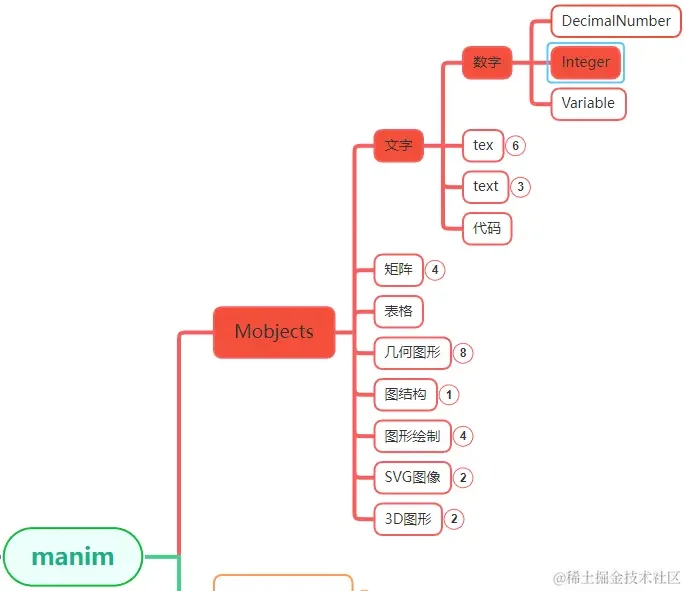
Integer是Mobjects分类中专门用来显示整数的一个class。DecimalNumber类不同之处在于,它只专注于整数的显示。Integer在manim各个模块中的位置如上图中所示。
1. 主要参数 Integer是继承自DecimalNumber的,所以使用Integer的地方,也可以使用DecimalNumber。Integer比较好,它默认会自动把小数部分省略掉。
Integer主要参数和上一篇中的DecimalNumber类似。Integer的场合基本都不需要指定参数。
2. 主要方法 与DecimalNumber一样,Integer的主要方法也是3个:
名称 说明
get_value
获取数值
set_value
设置数值
increment_value
增加数值
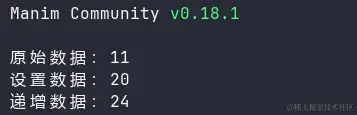
不过,与DecimalNumber不同的是,Integer的get_value方法会自动返回整数的部分。
1
2
3
4
5
6
7
8
9
from manim import *val = Integer(10.56 ) print (f"原始数据:{val.get_value()} " )val.set_value(20.22 ) print (f"设置数据:{val.get_value()} " )val.increment_value(3.9 ) print (f"递增数据:{val.get_value()} " )
get_value会对数值做四舍五入,然后返回整数。这点是与DecimalNumber的不同之处。
3. 使用示例 Integer类使用时不太需要指定参数,所以演示一些样式方面的示例。注意 :这里对于Integer的样式设置,同样适用于上一篇中的DecimalNumber。
3.1. 位置 通过设置x,yx,yx,y的坐标可以定位Integer显示的位置。( 0 , 0 ) X Y
1
2
3
4
5
6
7
8
9
10
from manim import *class IntegerDemo (Scene ): def construct (self ): head = Text("Integer: set_x / set_y" , font="Consolas" , font_size=26 , color=YELLOW).to_corner(UL, buff=0.4 ) x = Integer(123 ).set_x(-2 ).set_y(2 ) y = Integer(321 ).set_x(2 ).set_y(-2 ) self .add(head) self .play(FadeIn(x), run_time=1.0 ) self .play(FadeIn(y), run_time=1.0 ) self .wait(3.6 )
下载 Python 脚本
3.2. 大小 设置字体显示的大小用scale方法。
1
2
3
4
5
6
7
8
9
10
from manim import *class Demo (Scene ): def construct (self ): x = Integer(123 ).scale(0.5 ) y = Integer(321 ) z = Integer(213 ).scale(2 ) _obj = y self .play(FadeIn(_obj), run_time=1.0 ) self .wait(3.00 ) self .wait(1.60 )
下载 Python 脚本
3.3. 颜色 最后,演示设置Integer的颜色,可以设置单一的颜色,也可以设置渐变色。
1
2
3
4
5
6
7
8
9
10
from manim import *class IntegerDemo (Scene ): def construct (self ): head = Text("Integer: set_color / set_color_by_gradient" , font="Consolas" , font_size=26 , color=YELLOW).to_edge(UP) x = Integer(123 ).set_color(RED).scale(1.4 ).shift(LEFT * 2.5 + DOWN * 0.5 ) y = Integer(321123 ).set_color_by_gradient(BLUE_E, YELLOW_E).scale(1.4 ).shift(RIGHT * 2 + DOWN * 0.5 ) self .add(head) self .play(FadeIn(x), run_time=1.0 ) self .play(FadeIn(y), run_time=1.0 ) self .wait(3.6 )
下载 Python 脚本
4. 附件 最后再强调一遍,Integer继承自DecimalNumber,因此上一篇DecimalNumber中介绍的属性这里的Integer也可以使用。DecimalNumber也可以使用。
0
打赏作者 订阅 分享
主观感受,仅供参考。本文采用 本文采用 CC BY-NC-SA 4.0 许可 协议,
完整转载请注明来自
数学动画引擎 。