manim绘制图形时,除了上一节提到的那些必须的参数,还有一些可选的参数,
这些参数可以控制图形显示的样式。
绘制各类基本图形(点,线,圆,多边形等)时,每个图形都有自己的默认的样式,比如上一节的图形,
有的默认是白色,有的默认是红色。
控制图形样式的参数最常用的有以下四个:
- stroke_width:图形边框的粗细
- color:图形的颜色
- fill_color:图形的填充色
- fill_opacity:填充色的透明度,这个参数一般和
fill_color一起使用
1. 边框
线,圆和多边形都可以通过 stroke_width调整边框粗细程度。
线的边框:
1
2
3
4
5
6
7
8
9
10
11
12
13
14
15
| from manim import *
import numpy as np
from numpy import array, pi, cos, sin
run_time = 1
data = [[1, 2], [3, 4]]
def dot(pos, **kwargs):
return Dot(pos, **kwargs)
class Z0015(Scene):
def construct(self):
sc = self
self.play(*[FadeIn(_o) for _o in [Line([-1, 1, 0], [1, 1, 0], stroke_width=1)]], run_time=1.0)
self.play(*[FadeIn(_o) for _o in [Line([-1, 0, 0], [1, 0, 0], stroke_width=5)]], run_time=1.0)
self.play(*[FadeIn(_o) for _o in [Line([-1, -1, 0], [1, -1, 0], stroke_width=10)]], run_time=1.0)
self.wait(0.5)
self.wait(2.10)
|
下载 Python 脚本
上面的示例中是3种不同粗细的线
运行效果:
圆的边框:
1
2
3
4
5
6
7
8
9
10
11
12
13
14
15
| from manim import *
import numpy as np
from numpy import array, pi, cos, sin
run_time = 1
data = [[1, 2], [3, 4]]
def dot(pos, **kwargs):
return Dot(pos, **kwargs)
class Z0016(Scene):
def construct(self):
sc = self
Circle(radius=0.8, stroke_width=1).shift(LEFT * 2)
self.play(*[FadeIn(_o) for _o in [Circle(radius=0.8, stroke_width=5)]], run_time=1.0)
Circle(radius=0.8, stroke_width=10).shift(RIGHT * 2)
self.wait(0.5)
self.wait(4.10)
|
下载 Python 脚本
运行效果:
多变形的边框:
1
2
3
4
5
6
7
8
9
10
11
12
13
14
| from manim import *
import numpy as np
from numpy import array, pi, cos, sin
run_time = 1
data = [[1, 2], [3, 4]]
def dot(pos, **kwargs):
return Dot(pos, **kwargs)
class Z0017(Scene):
def construct(self):
sc = self
self.play(*[FadeIn(_o) for _o in [Polygon([-3, 1, 0], [-1, 1, 0], [-2, -1, 0], stroke_width=5)]], run_time=1.0)
self.play(*[FadeIn(_o) for _o in [Polygon([1, 1, 0], [2, 0, 0], [3, 1, 0], [3, -1, 0], [1, -1, 0], stroke_width=10)]], run_time=1.0)
self.wait(0.5)
self.wait(3.10)
|
下载 Python 脚本
运行效果:
2. 颜色
各种基本图形本身有默认的颜色,比如线默认是白色,圆默认红色,多边形默认蓝色等。
除了默认颜色,manim还预置了一系列的颜色,可以直接按颜色的名称来使用。
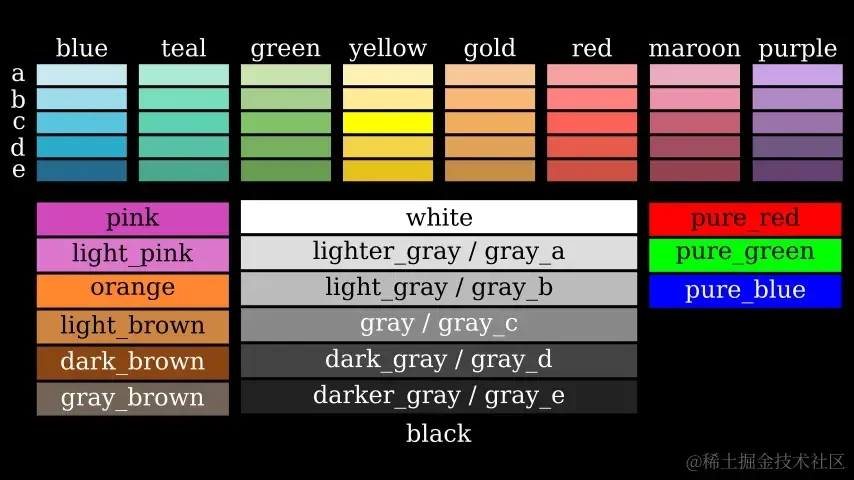
设置图形的颜色,使用 color属性。
线的颜色:(线默认是白色)
1
2
3
4
5
6
7
8
9
10
11
12
13
14
15
| from manim import *
import numpy as np
from numpy import array, pi, cos, sin
run_time = 1
data = [[1, 2], [3, 4]]
def dot(pos, **kwargs):
return Dot(pos, **kwargs)
class Z0018(Scene):
def construct(self):
sc = self
self.play(*[FadeIn(_o) for _o in [Line([-1, 1, 0], [1, 1, 0], stroke_width=1, color=RED)]], run_time=1.0)
self.play(*[FadeIn(_o) for _o in [Line([-1, 0, 0], [1, 0, 0], stroke_width=5, color=YELLOW)]], run_time=1.0)
self.play(*[FadeIn(_o) for _o in [Line([-1, -1, 0], [1, -1, 0], stroke_width=10, color=GREEN)]], run_time=1.0)
self.wait(0.5)
self.wait(2.10)
|
下载 Python 脚本
运行效果:
圆的颜色:(线默认是红色)
1
2
3
4
5
6
7
8
9
10
11
12
13
14
15
| from manim import *
import numpy as np
from numpy import array, pi, cos, sin
run_time = 1
data = [[1, 2], [3, 4]]
def dot(pos, **kwargs):
return Dot(pos, **kwargs)
class Z0019(Scene):
def construct(self):
sc = self
Circle(radius=0.8, stroke_width=1, color=RED).shift(LEFT * 2)
self.play(*[FadeIn(_o) for _o in [Circle(radius=0.8, stroke_width=5, color=YELLOW)]], run_time=1.0)
Circle(radius=0.8, stroke_width=10, color=GREEN).shift(RIGHT * 2)
self.wait(0.5)
self.wait(4.10)
|
下载 Python 脚本
运行效果:
多边形的颜色:(线默认是蓝色)
1
2
3
4
5
6
7
8
9
10
11
12
13
14
| from manim import *
import numpy as np
from numpy import array, pi, cos, sin
run_time = 1
data = [[1, 2], [3, 4]]
def dot(pos, **kwargs):
return Dot(pos, **kwargs)
class Z0020(Scene):
def construct(self):
sc = self
self.play(*[FadeIn(_o) for _o in [Polygon([-3, 1, 0], [-1, 1, 0], [-2, -1, 0], stroke_width=5, color=RED)]], run_time=1.0)
self.play(*[FadeIn(_o) for _o in [Polygon([1, 1, 0], [2, 0, 0], [3, 1, 0], [3, -1, 0], [1, -1, 0], stroke_width=10, color=GREEN)]], run_time=1.0)
self.wait(0.5)
self.wait(3.10)
|
下载 Python 脚本
运行效果:
3. 填充
最后是填充色,关联两个属性:fill_color和 fill_opacity。
这两个属性一般用在闭合的图形中,比如圆和多边形。
圆的填充:
1
2
3
4
5
6
7
8
9
10
11
12
13
14
15
| from manim import *
import numpy as np
from numpy import array, pi, cos, sin
run_time = 1
data = [[1, 2], [3, 4]]
def dot(pos, **kwargs):
return Dot(pos, **kwargs)
class Z0021(Scene):
def construct(self):
sc = self
Circle(radius=0.8, stroke_width=1, color=RED, fill_color=YELLOW, fill_opacity=0.5).shift(LEFT * 2)
self.play(*[FadeIn(_o) for _o in [Circle(radius=0.8, stroke_width=5, color=YELLOW, fill_color=GREEN, fill_opacity=0.5)]], run_time=1.0)
Circle(radius=0.8, stroke_width=10, color=GREEN, fill_color=RED, fill_opacity=0.5).shift(RIGHT * 2)
self.wait(0.5)
self.wait(4.10)
|
下载 Python 脚本
运行效果:
多边形的填充:
1
2
3
4
5
6
7
8
9
10
11
12
13
14
| from manim import *
import numpy as np
from numpy import array, pi, cos, sin
run_time = 1
data = [[1, 2], [3, 4]]
def dot(pos, **kwargs):
return Dot(pos, **kwargs)
class Z0022(Scene):
def construct(self):
sc = self
self.play(*[FadeIn(_o) for _o in [Polygon([-3, 1, 0], [-1, 1, 0], [-2, -1, 0], stroke_width=5, color=RED, fill_color=GREEN, fill_opacity=0.5)]], run_time=1.0)
self.play(*[FadeIn(_o) for _o in [Polygon([1, 1, 0], [2, 0, 0], [3, 1, 0], [3, -1, 0], [1, -1, 0], stroke_width=10, color=GREEN, fill_color=RED, fill_opacity=0.5)]], run_time=1.0)
self.wait(0.5)
self.wait(3.10)
|
下载 Python 脚本
运行效果:
4. 总结回顾
制作动画时,利用边框和颜色,可以有效的区分各个图形之间区别,也可以突出重点要表示的部分。
尝试多使用上述四个属性,让动画更加美观。
stroke_width,color,fill_color,fill_opacity

主观感受,仅供参考。本文采用 本文采用 CC BY-NC-SA 4.0 许可 协议,
完整转载请注明来自
数学动画引擎。