几何图形是manim中最重要的一类模块,manim内置了丰富的各类几何图形,点 开始,逐个介绍manim中的几何模块。
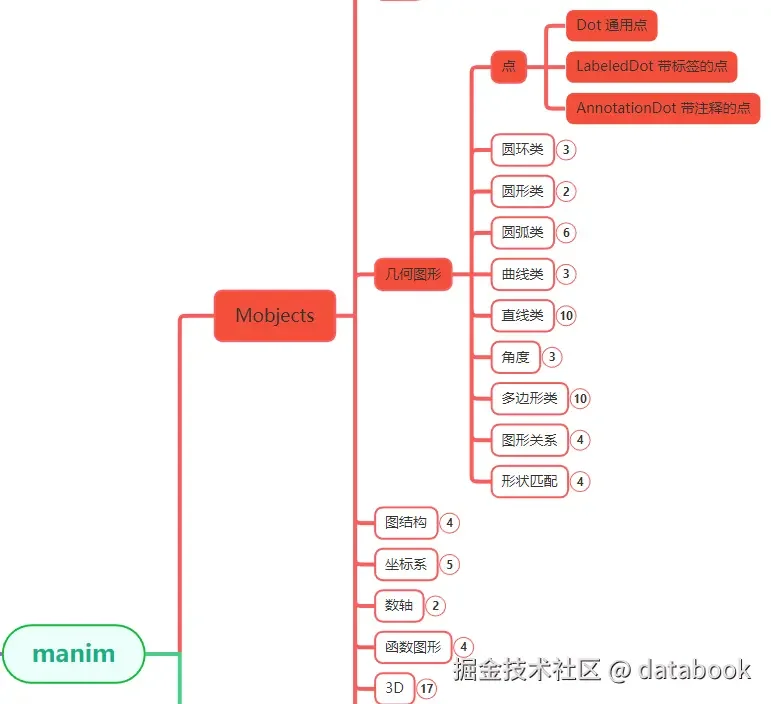
manim中点相关的模块主要有3个:
Dot:通用的点LabeledDot:在点的中间可以加一些说明文字AnnotationDot:使用在注释场景中的点
Dot系列在manim各个模块中的位置大致如上图中所示。
1. 主要参数 点 比较简单,所以参数不多,主要就是控制点的大小,颜色,透明度等等属性。Dot对象:
参数名称 类型 说明
point
[float,float,float]
点的坐标
radius
float
点的半径
stroke_width
float
边框厚度
fill_opacity
float
透明度
color
str
颜色
LabeledDot对象,继承自Dot对象,包含Dot的属性,此外还有:
参数名称 类型 说明
label
str
点中的文本内容
AnnotationDot对象,继承自Dot对象,包含Dot的属性,此外还有:
参数名称 类型 说明
stroke_color
str
外框颜色
fill_color
str
内部的颜色
2. 使用示例 这三种点 对象中,使用最多的Dot对象,下面通过一些示例演示点的使用。
2.1. 大小 调节点 的大小主要就是调节点的半径radius。
1
2
3
4
5
6
7
8
9
10
11
12
13
14
15
16
17
18
19
from manim import *import numpy as npfrom numpy import array, pi, cos, sinrun_time = 1 data = [[1 , 2 ], [3 , 4 ]] def dot (pos, **kwargs ): return Dot(pos, **kwargs) class N023_01 (Scene ): def construct (self ): sc = self d1 = Dot(radius=0.04 ) d2 = Dot() d3 = Dot(radius=0.24 ) d4 = Dot(radius=0.32 ) d5 = Dot(radius=0.64 ) self .play(FadeIn(d5), run_time=1.0 ) self .wait(1 ) self .wait(0.5 ) self .wait(3.10 )
下载 Python 脚本
2.2. 颜色 点 的color属性可以设置颜色。
1
2
3
4
5
6
7
8
9
10
11
12
13
14
15
16
from manim import *FONT = "STLiti" class Demo (Scene ): def construct (self ): head = Text("不同颜色的点" , font=FONT, font_size=36 , color=YELLOW).to_edge(UP, buff=0.6 ) bar = Line(LEFT * 6.6 , RIGHT * 6.6 , color=BLUE).next_to(head, DOWN, buff=0.12 ) self .play(FadeIn(head), Create(bar), run_time=0.6 ) cols = [("RED" , RED), ("GREEN" , GREEN), ("BLUE" , BLUE), ("YELLOW" , YELLOW), ("PURPLE" , PURPLE)] dots = VGroup(*[Dot(radius=0.3 , color=c) for _, c in cols]).arrange(RIGHT, buff=1.1 ) caps = VGroup(*[Text(n, font="Consolas" , font_size=22 , color=c) for n, c in cols]) for i, cap in enumerate (caps): cap.next_to(dots[i], DOWN, buff=0.35 ) for i in range (5 ): self .play(FadeIn(dots[i]), FadeIn(caps[i]), run_time=0.5 ) self .wait(2.5 )
下载 Python 脚本
2.3. 标签 点 中带标签,需要使用LabeledDot对象,它的label属性除了可以显示字母和数字之外,
1
2
3
4
5
6
7
8
9
10
11
12
13
from manim import *class Demo (Scene ): def construct (self ): d1 = LabeledDot( label=Text("中文" , font_size=20 ), ) d2 = LabeledDot(label="a^2" ) d3 = LabeledDot(label="32" ) d4 = LabeledDot(label="V_i" ) _obj = d4 self .play(FadeIn(_obj), run_time=1.0 ) self .wait(3.00 ) self .wait(1.60 )
下载 Python 脚本
label属性不能直接输入中文,需要通过Text对象来输入中文;Latex格式的字符串即可,输出时会被渲染成公式。
2.4. 边框和内部 AnnotationDot对象是用来在视频中加注释和标注的,它将点分为边框 和内部 两部分,
1
2
3
4
5
6
7
8
9
10
11
12
13
14
15
16
17
18
19
20
21
22
23
24
25
26
27
from manim import *class Demo (Scene ): def construct (self ): d1 = AnnotationDot( stroke_width=2 , stroke_color=RED, fill_color=GREEN, ) d2 = AnnotationDot( stroke_width=10 , stroke_color=BLUE, fill_color=YELLOW, ) d3 = AnnotationDot( stroke_width=20 , stroke_color=YELLOW, fill_color=RED, ) d4 = AnnotationDot( stroke_width=40 , stroke_color=GREEN, fill_color=PURPLE, ) _obj = d4 self .play(FadeIn(_obj), run_time=1.0 ) self .wait(3.00 ) self .wait(1.60 )
下载 Python 脚本
stroke_width属性设置外框 的粗细,stroke_color属性设置外框的颜色,fill_color设置内部的颜色。
3. 附件
0
打赏作者 订阅 分享
主观感受,仅供参考。本文采用 本文采用 CC BY-NC-SA 4.0 许可 协议,
完整转载请注明来自
数学动画引擎 。