SingleStringMathTex是Mobjects分类中用来显示数学公式的class。manim中有3个可以用来显示数学公式的class,还有两个是MathTex和Tex,后续再介绍。
从SingleStringMathTex的名称中也可以看出,它是用来显示只有一行的简单公式。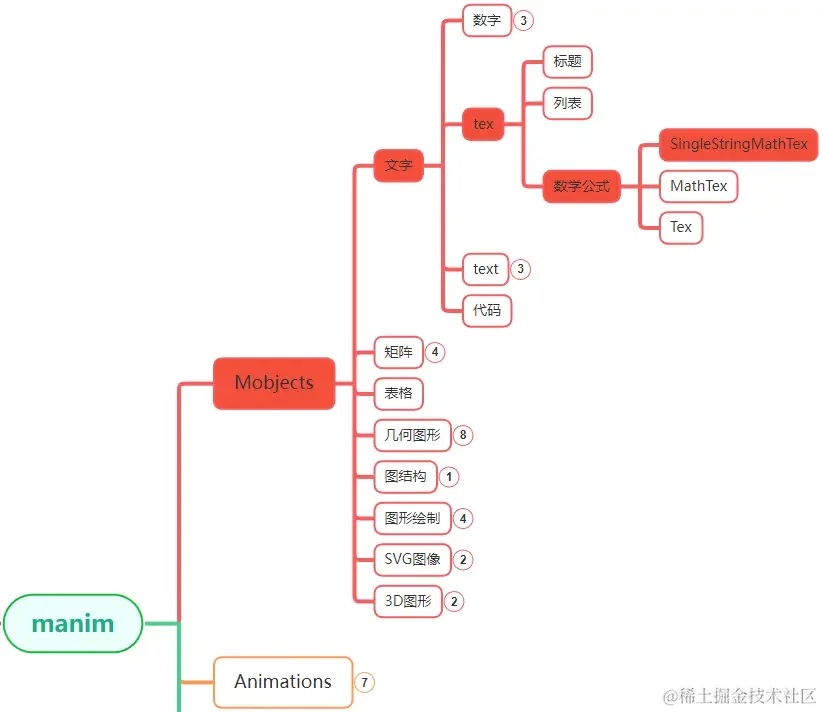
SingleStringMathTex在manim各个模块中的位置大致如上图中所示。
1. 主要参数
SingleStringMathTex主要用于显示只有一行的数学公式,所以参数也比较简单:
| 参数名称 | 类型 | 说明 |
|---|---|---|
| tex_string | string | latex格式的公式 |
| stroke_width | float | 粗细 |
| height | float | 高度 |
| font_size | float | 字体大小 |
| tex_environment | str | 不熟悉latex的话不要设置 |
| tex_template | object | 不熟悉latex的话不要设置 |
2. 主要方法
SingleStringMathTex的主要方法只有两个:
| 名称 | 说明 |
|---|---|
| get_tex_string | 获取公式原始的latex字符串 |
| init_colors | 初始化颜色,目前是空方法 |
注意,init_colors在SingleStringMathTex中是个空方法,也就是没有实现任何功能,
继承SingleStringMathTex子类可以实现此方法来设置颜色。
3. 使用示例
3.1. 显示样式
参数stroke_width和height可以控制公式的样式。
1 | from manim import * |
3.2. 字体大小
通过font_size参数调节字体的大小,font_size和height都可以调节大小。
它们区别之处在于,font_size是调节字体,height是调节整个公式占据空间的高度。
1 | from manim import * |
3.3. 原始字符
数学公式中的很多特殊符号都是无法直接通过键盘输入的,要想输入这些公式,可以输入latex字符串,
然后manim会自动将latex字符串转换成数学公式来显示。SingleStringMathTex的get_tex_string可以让我们反向得到原始的latex字符串。
1 | from manim import * |