Code这个模块比较特殊,是专门用来显示代码用的。
平时如何制作数学动画的话,这个模块是用不着的,除非你想做一些编程方面的教学。
manim边学边做--Code
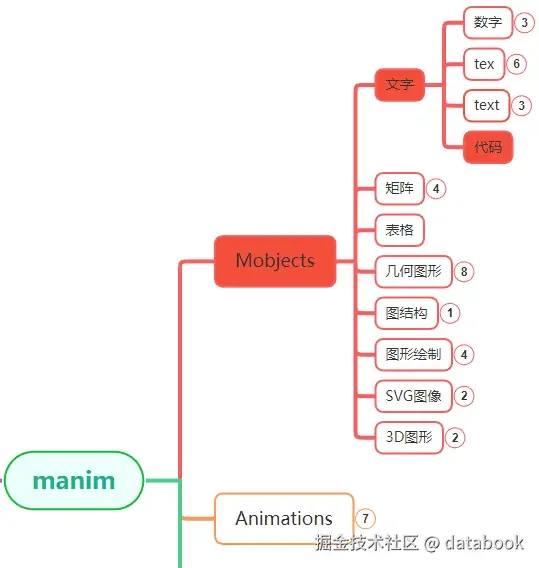
Code在manim各个模块中的位置大致如上图中所示。

1. 主要参数

Code模块是用来显示代码的,所以,如果你也写过代码的话,
会发现它的很多参数相当于代码编辑器上的一些显示设置。

参数名称 类型 说明
file_name str 代码文件路径
code str 字符串形式的代码
tab_width int 制表符对应的空格数
line_spacing float 行间距
font_size float 字体大小
font str 字体
stroke_width float 字体线条粗细
margin float 文本与背景的内边距
indentation_chars str 缩进的字符,可指定空格或制表符
background str 背景的类型
background_stroke_width float 背景的线条粗细
background_stroke_color str 背景的线条颜色
corner_radius float 背景圆角的半径
insert_line_no bool 是否插入行号
line_no_from int 行号开始的数字
line_no_buff float 行号与代码的距离
style str 显示代码的样式
language str 代码的语言
generate_html_file bool 是否生成代码高亮的html文件
warn_missing_font bool 字体缺失时是否警告提示

file_name和code只有一个有效,如果参数有file_name,那么就从文件中读取代码,
否则直接将code字符串作为代码显示。

参数style表示代码以何种样式显示,通过下面的代码可以查看支持哪些style:

1
2
3
4
5
6
7
8
9
10
11
12
13
14
15
16
17
18
19
20
21
22
23
from manim import *

print(Code.styles_list)
## 输出结果
[
'default', 'emacs', 'friendly',
'friendly_grayscale', 'colorful',
'autumn', 'murphy', 'manni',
'material', 'monokai', 'perldoc',
'pastie', 'borland', 'trac',
'native', 'fruity',
'bw', 'vim', 'vs',
'tango', 'rrt', 'xcode',
'igor', 'paraiso-light',
'paraiso-dark', 'lovelace',
'algol', 'algol_nu', 'arduino',
'rainbow_dash', 'abap', 'solarized-dark',
'solarized-light', 'sas', 'staroffice',
'stata', 'stata-light', 'stata-dark',
'inkpot', 'zenburn', 'gruvbox-dark',
'gruvbox-light', 'dracula', 'one-dark',
'lilypond', 'nord', 'nord-darker',
'github-dark']

内置支持的样式还不少。

参数background只有两种值可选:rectangle和window。
参数language表示支持高亮显示的代码语言,常用的语言py,java,go,c,cpp等等都支持。

2. 使用示例

下面演示一些在动画中展示代码常用的参数。

2.1. 高亮不同语言

Code模块支持的语言很多,这里只尝试了几种。

1
2
3
4
5
6
7
8
9
10
11
12
13
14
15
16
17
from manim import *
FONT = "STLiti"
CCODE = '#include <stdio.h>\nint main()\n{\n printf("Hello, World!");\n return 0;\n}'
def make_title(en, zh):
a = Text(en, font="Consolas", font_size=34, color=RED)
z = Text(zh, font=FONT, font_size=34, color=RED)
return VGroup(a, z).arrange(RIGHT, buff=0.15).to_corner(UL, buff=0.6)
class Demo(Scene):
def construct(self):
head = make_title("C", "代码:")
bar = Line(LEFT * 6.6, RIGHT * 6.6, color=BLUE).next_to(head, DOWN, buff=0.12)
code = Code(code_string=CCODE, language="c", formatter_style="vim",
paragraph_config={"font": "Consolas", "font_size": 28})
code.scale(1.15).move_to(DOWN * 0.3)
self.play(FadeIn(head), Create(bar), run_time=0.8)
self.play(FadeIn(code), run_time=1.2)
self.wait(3.6)

下载 Python 脚本

2.2. 不同显示风格

参数style设置不同的代码显示风格。

1
2
3
4
5
6
7
8
9
10
11
12
13
14
15
16
17
from manim import *
FONT = "STLiti"
PYCODE = 'def hello(s):\n print(f"Hello {s}!")\n\nhello("Manim")'
def make_title(en, zh):
a = Text(en, font="Consolas", font_size=34, color=RED)
z = Text(zh, font=FONT, font_size=34, color=RED)
return VGroup(a, z).arrange(RIGHT, buff=0.15).to_corner(UL, buff=0.6)
class Demo(Scene):
def construct(self):
head = make_title("github", "风格:")
bar = Line(LEFT * 6.6, RIGHT * 6.6, color=BLUE).next_to(head, DOWN, buff=0.12)
code = Code(code_string=PYCODE, language="python", formatter_style="github-dark",
paragraph_config={"font": "Consolas", "font_size": 28})
code.scale(1.2).move_to(DOWN * 0.3)
self.play(FadeIn(head), Create(bar), run_time=0.8)
self.play(FadeIn(code), run_time=1.2)
self.wait(3.6)

下载 Python 脚本

2.3. 代码背景

代码的背景主要涉及background,background_stroke_width,background_stroke_color,corner_radius等几个参数。

1
2
3
4
5
6
7
8
9
10
11
12
13
14
15
16
17
18
19
20
from manim import *
FONT = "STLiti"
PYCODE = 'def hello(s):\n print(f"Hello {s}!")\n\nhello("Manim")'
def make_title(en, zh):
a = Text(en, font="Consolas", font_size=34, color=RED)
z = Text(zh, font=FONT, font_size=34, color=RED)
return VGroup(a, z).arrange(RIGHT, buff=0.15).to_corner(UL, buff=0.6)
class Demo(Scene):
def construct(self):
head = make_title("window", "背景:")
bar = Line(LEFT * 6.6, RIGHT * 6.6, color=BLUE).next_to(head, DOWN, buff=0.12)
code = Code(code_string=PYCODE, language="python", formatter_style="vim",
background="window",
background_config={"corner_radius": 1.1, "stroke_color": "#c9a227",
"buff": 0.5},
paragraph_config={"font": "Consolas", "font_size": 28})
code.scale(1.2).move_to(DOWN * 0.3)
self.play(FadeIn(head), Create(bar), run_time=0.8)
self.play(FadeIn(code), run_time=1.2)
self.wait(3.6)

下载 Python 脚本

2.4. 导出html文件

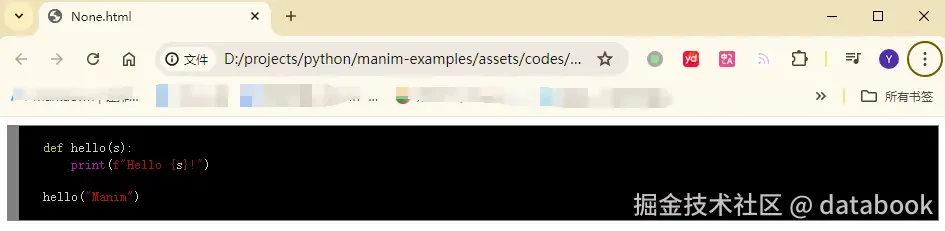
Code模块还可以将代码导出到html。

1
2
3
4
5
6
7
8
9
10
from manim import *
class Demo(Scene):
def construct(self):
s = 'def hello(s):\n print(f"Hello {s}!")\n\nhello("Manim")'
code = Code(code_string=s, language="python", formatter_style="vim",
paragraph_config={"font": "Consolas", "font_size": 28})
self.play(FadeIn(code.scale(1.2)), run_time=1.0)
self.wait(4.6)
with open("code_highlight.html", "w", encoding="utf-8") as f:
f.write(str(code._code_html))

执行之后,导出的html文件位于项目目录下的assets\codes\generated_html_files文件夹中。

manim边学边做--Code

3. 附件