对于长篇大段的文本显示,manim中专门提供了一个Paragraph类。
使用Paragraph,就不需要用拼接Text的方式来显示大段的文本。
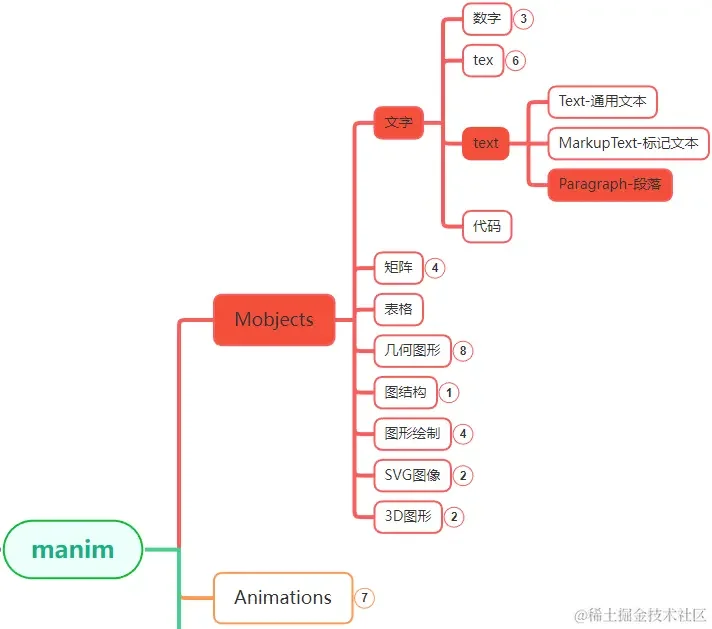
Paragraph在manim各个模块中的位置大致如上图中所示。
1. 主要参数
Paragraph可以看作是基于Text的扩展,当你需要显示多行文本的时候,用Paragraph更加方便。
上一篇Text的文章中介绍的主要参数Paragraph也可以使用,比如t2*系列的那些函数。
Paragraph特有的参数还有:
| 参数名称 |
类型 |
说明 |
| text |
list |
可以输入多个字符串 |
| line_spacing |
float |
行间距 |
| alignment |
str |
对齐方向 |
Text也有text参数,是str类型,只能输入一个字符串,
而Paragraph的text参数是不定长的列表,可以输入多个字符串,每个字符串显示成一行。
line_spacing参数Text也有,不过Text多用来显示单行的文本,这个参数用处不大,
而Paragraph则用来显示多行文本,所以line_spacing对Paragraph更加有用。
alignment参数用来设置段落文本各行的对齐方式的,默认左对齐,还可以设置右对齐和居中对齐。
2. 使用示例
段落Paragraph也可以使用Text的各种参数,这里前两个示例演示Paragraph常用的两个参数,
最后一个示例演示使用Text的参数来设置颜色。
Text中设置字体,样式的参数,Paragraph也同样支持,这里不再演示了,可以参考 manim边学边做–Text
2.1. 调整行间距
通过line_spacing设置不同的行间距。
1
2
3
4
5
6
7
8
9
10
11
12
13
14
15
16
| from manim import *
FONT = "STLiti"
L1 = "第一行:内容中等内容中等"
L2 = "第二行:内容短"
L3 = "第三行:内容较长内容较长内容较长"
class Demo(Scene):
def construct(self):
head = Text("较大行间距:", font=FONT, font_size=36, color=RED).to_corner(UL, buff=0.6)
bar = Line(LEFT * 6.6, RIGHT * 6.6, color=BLUE).next_to(head, DOWN, buff=0.12)
self.play(FadeIn(head), Create(bar), run_time=0.8)
paras = [Paragraph(L1, L2, L3, line_spacing=s, font=FONT, font_size=34).move_to(DOWN * 0.5)
for s in (0.5, 1.5, 2.5)]
self.play(FadeIn(paras[0]), run_time=0.8)
self.play(FadeOut(paras[0]), FadeIn(paras[1]), run_time=0.9)
self.play(FadeOut(paras[1]), FadeIn(paras[2]), run_time=0.9)
self.wait(2.2)
|
下载 Python 脚本
2.2. 调整对齐方向
通过alignment设置不同的对齐方向。
1
2
3
4
5
6
7
8
9
10
11
12
13
14
15
16
| from manim import *
FONT = "STLiti"
L1 = "第一行:内容中等内容中等"
L2 = "第二行:内容短"
L3 = "第三行:内容较长内容较长内容较长"
class Demo(Scene):
def construct(self):
head = Text("居中对齐:", font=FONT, font_size=36, color=RED).to_corner(UL, buff=0.6)
bar = Line(LEFT * 6.6, RIGHT * 6.6, color=BLUE).next_to(head, DOWN, buff=0.12)
self.play(FadeIn(head), Create(bar), run_time=0.8)
paras = [Paragraph(L1, L2, L3, alignment=a, font=FONT, font_size=34).move_to(DOWN * 0.8)
for a in ("left", "right", "center")]
self.play(FadeIn(paras[0]), run_time=0.8)
self.play(FadeOut(paras[0]), FadeIn(paras[1]), run_time=0.9)
self.play(FadeOut(paras[1]), FadeIn(paras[2]), run_time=0.9)
self.wait(2.2)
|
下载 Python 脚本
2.3. 设置颜色
设置颜色这个示例是为了演示Paragraph也可以使用Text的参数。
1
2
3
4
5
6
7
8
9
10
11
12
13
14
15
16
17
18
19
20
21
22
| from manim import *
class Demo(Scene):
def construct(self):
p = Paragraph(
"第一行:内容中等内容中等",
"第二行:内容短",
"第三行:内容较长内容较长内容较长",
t2c={
"第一行": RED,
"第二行": BLUE,
"第三行": GREEN,
},
t2g={
"内容中等": (BLUE, GREEN),
"内容短": (GREEN, RED),
"内容较长": (RED, BLUE),
},
)
_obj = p
self.play(FadeIn(_obj), run_time=1.0)
self.wait(3.00)
self.wait(1.60)
|
下载 Python 脚本
3. 附件

主观感受,仅供参考。本文采用 本文采用 CC BY-NC-SA 4.0 许可 协议,
完整转载请注明来自
数学动画引擎。