Manim的线其实都是线段,绘制线只要提供两个点的坐标,Manim中的线主要分为以下几类,涵盖直线、带箭头的线、虚线及特殊类型线,下面我们逐一的进行分析,篇幅有点长,多看几遍,记得收藏。
1.线的一般表达式
1
2
3
4
5
6
7
8
9
10
11
12
13
14
| Line(
start: Sequence[float] = LEFT,
end: Sequence[float] = RIGHT,
path_arc: float = 0,
angle=PI/4,
color: Color = WHITE,
stroke_width: float = DEFAULT_STROKE_WIDTH,
stroke_opacity: float = 1.0,
buff: float = 0,
line_cap: np.ndarray = np.array([0, 0, 0]),
joint_type: str = "auto",
line_func: Callable[[np.ndarray, np.ndarray], np.ndarray] = straight_line,
**kwargs
)
|
2.参数分析:
1
2
3
4
5
6
7
8
9
10
11
12
13
14
15
16
17
18
19
20
21
22
| start: Sequence[float] = LEFT
end: Sequence[float] = RIGHT
path_arc: float = 0
angle=PI/4,
buff: float = 0
color: Color = WHITE
stroke_width: float = DEFAULT_STROKE_WIDTH
stroke_opacity: float = 1.0
line_cap: np.ndarray = np.array([0, 0, 0])
joint_type: str = "auto"
line_func: Callable = straight_line
sheen_factor: float = 0.0
sheen_direction: np.ndarray = UL
z_index: int = 0
|
3.常见的线
3.1直线(Line)
通过两个点绘制普通直线,支持设置颜色和线宽。例如:
1
2
3
4
5
6
7
8
| from manim import *
class CreateLine(Scene):
def construct(self):
l = Line([-2,1,0], [3,1,0], color=RED, stroke_width=5)
text = Text("任意类型的直线").next_to(l,DOWN,buff=2)
self.play(Create(l),Create(text))
self.wait(2)
|
输出效果如下
3.2.带箭头的线(Arrow)
通过两个点绘制带单向箭头的线,适用于指示方向,例如:
1
2
3
4
5
6
7
8
| from manim import *
class CreateArrow(Scene):
def construct(self):
l = Arrow([-2,1,0], [3,1,0], color=RED, stroke_width=5)
text = Text("带箭头的直线").next_to(l,DOWN,buff=2)
self.play(Create(l),Create(text))
self.wait(2)
|
演示的效果如下
3.3.虚线(DashedLine)
在Line基础上添加虚线效果,需设置dash_length(每小段长度)和dashed_ratio(疏密比例),例如:
1
2
3
4
5
6
7
8
| from manim import *
class CreateDashedLine(Scene):
def construct(self):
l = DashedLine([-2,1,0], [3,1,0], color=RED, dash_length=1, dashed_ratio=2)
text = Text("任意类型的虚线").next_to(l,DOWN,buff=2)
self.play(Create(l),Create(text))
self.wait(2)
|
显示的效果如下
3.4切线(TangentLine)
根据几何体(如圆)绘制切线,需指定几何体对象、方向角度及长度,例如:
1
2
3
4
5
6
7
8
9
| from manim import *
class CreateTangentLine(Scene):
def construct(self):
c = Circle()
t = TangentLine(c, alpha=1, length=2)
text = Text("圆的一条切线").next_to(c, DOWN, buff=0.5)
self.play(Create(c), Create(t), Write(text))
self.wait(2)
|
参数 :vmob(几何体)、alpha(方向)、length(长度),演示的效果如下
3.5.数轴
数轴是最常见的直线,规定了原点、正方向和单位长度的直线叫做数轴,下面我们来看数轴。
1
2
3
4
5
6
7
8
9
10
11
12
13
14
15
16
17
| from manim import *
class NumberLineComplete(Scene):
def construct(self):
number_line = NumberLine(
x_range=[-3.5, 3.5, 1],
length=8,
include_numbers=True,
include_ticks=True,
label_direction=DOWN,
color=BLUE,
stroke_width=3
).add_tip()
text = Text("完整参数数轴").next_to(number_line, DOWN,buff=2)
self.play(Create(number_line), Write(text))
self.wait(2)
|
下面是演示的效果
3.6.带双箭头的线
1
2
3
4
5
6
7
8
9
10
11
12
| from manim import *
class DoubleArrowLine(Scene):
def construct(self):
line = Line([-2, 1, 0], [3, 1, 0], color=RED)
line.add_tip()
line.add_tip(at_start=True)
text = Text("带双箭头的直线").next_to(line, DOWN, buff=2)
self.play(Create(line), Write(text))
self.wait(2)
|
从上面的代码我们不难看出,带有双箭头的直线,是在一般直线上添加箭头制作的,.add_tip() 用于添加箭头,参数只有一个 at_start=True。
3.7.带弧度的线
1
2
3
4
5
6
7
8
9
10
11
12
13
14
15
16
| from manim import *
class CreateCurvedLine(Scene):
def construct(self):
curve = ArcBetweenPoints(
start=[-2, 1, 0],
end=[3, 1, 0],
angle=PI/4,
color=RED,
stroke_width=5
)
text = Text("带弧度的线").next_to(curve, DOWN, buff=2)
self.play(Create(curve), Create(text))
self.wait(2)
|
显示的效果
在这里重复一段代码,使用的参数不同,谁然都是表示的带有一定弯曲的直线,
1
2
3
4
5
6
7
8
9
10
11
12
13
14
15
16
17
18
19
20
| from manim import *
class DifferentCurves(Scene):
def construct(self):
curve1 = Line([-3, 2, 0], [3, 2, 0], path_arc=PI/2, color=RED)
label1 = Text("向上弯曲 (π/2)", font_size=24).next_to(curve1, UP)
curve2 = Line([-3, 0, 0], [3, 0, 0], path_arc=PI/6, color=BLUE)
label2 = Text("轻微弯曲 (π/6)", font_size=24).next_to(curve2, UP)
curve3 = Line([-3, -2, 0], [3, -2, 0], path_arc=-PI/3, color=GREEN)
label3 = Text("向下弯曲 (-π/3)", font_size=24).next_to(curve3, DOWN)
self.play(Create(curve1), Write(label1))
self.play(Create(curve2), Write(label2))
self.play(Create(curve3), Write(label3))
self.wait(2)
|
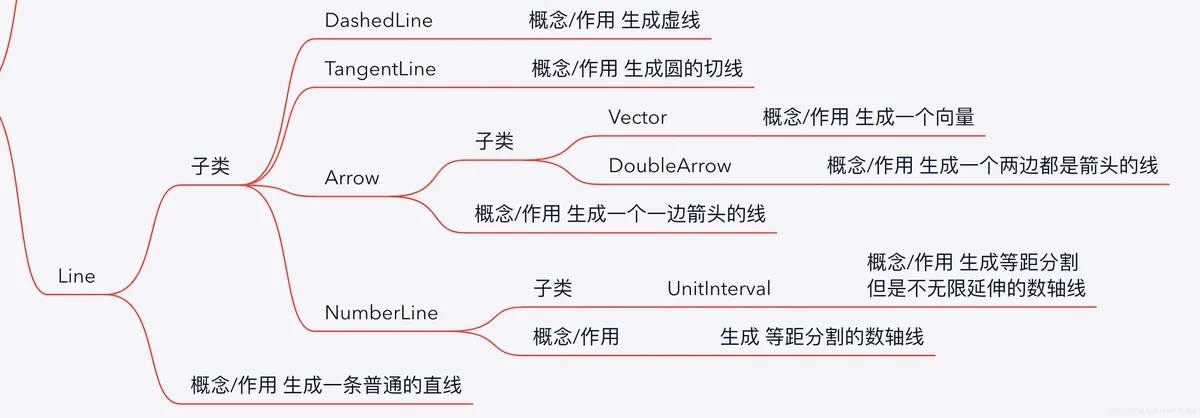
总结 :从上面的图标中,我们不难看出Manim的线类通过继承Line模块扩展,支持直线、带箭头线、虚线等基础类型,并提供切线、向量等特殊功能。绘制时需根据需求选择合适类,并通过参数调整样式。至于圆的切线问题,我们还会做专门的介绍。

主观感受,仅供参考。本文采用 本文采用 CC BY-NC-SA 4.0 许可 协议,
完整转载请注明来自
数学动画引擎。